mydlink
- 3.6
- Rating
- 1.00M
- Installs
- Free
- Price
 Analysis by App-foxy
Managing connected cameras, sensors, plugs, and other smart-home equipment can become surprisingly repetitive. Each device may have its own app, login, notification setting, and control screen, so a simple check of the home can turn into a tour through several apps. mydlink is designed to reduce that routine by bringing compatible D-Link devices and their interactions into one place. After using it, I found its main value less exciting than a new gadget, but more practical: it can save small amounts of time every day by putting common controls and alerts closer together.
This is a free productivity app from D-Link Corporation, available for Everyone and intended for people who already use compatible D-Link hardware. It has been available since January 26, 2018, and the current version is 2.17.0 for devices running Android 8.0 or later. The app has passed the million-install mark, with an average rating of 3.6 from roughly 63 thousand ratings. That combination tells me something useful: mydlink has a substantial user base, but the experience is not universally smooth. It is worth trying when your home already contains D-Link products, though I would not install it expecting it to control equipment from every smart-home brand.
Why a single control app matters in real life
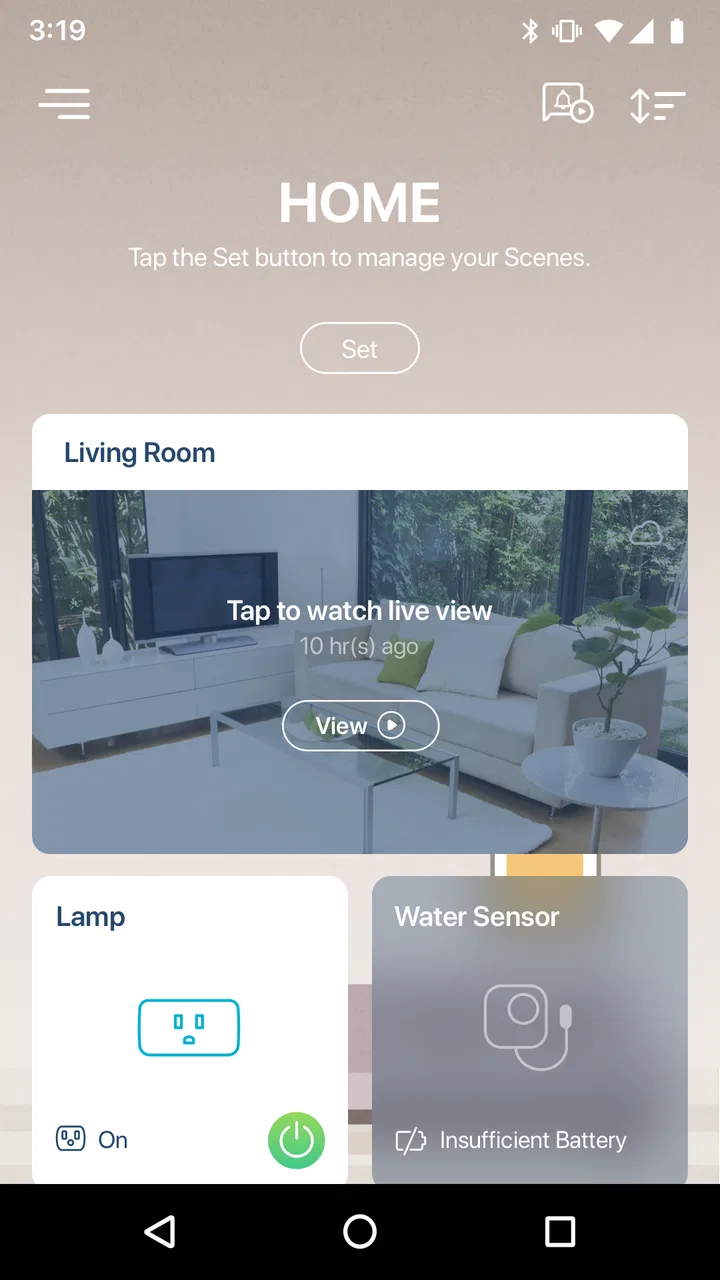
The recurring problem is not usually turning a device on or opening a camera view. The problem is remembering which app handles which device, finding the right account, and checking several places before leaving home. A centralized dashboard can make those small decisions less tiring. In my experience, that is where mydlink makes the strongest case for itself: it turns a collection of D-Link devices into a more coherent household routine instead of leaving each product isolated.
You May Also Like

 Google Keep - Notes and lists
Google Keep’s Quiet Growth Shows the Appeal of Simpler Notes
As mobile work gets busier, Google Keep keeps winning a simple contest: capture a thought quickly, find it later, and get on with the day.

 Blood Strike: 2.5 Anniversary
Blood Strike’s Loadouts Turn Every Drop Into a Tactical Gamble
A close look at Blood Strike’s custom loadouts: how fast access to signature weapons reshapes its battle royale rhythm, rewards preparation, and narrows the gap between fights.

 Pandora - Music & Podcasts
Pandora’s Music Is Easy to Start, but Harder to Recover
Pandora’s strength is its low-effort path from a seed to a station. Its weak spot is how much confidence it asks you to place in connection, setup, and quiet recovery.

 8 Ball Pool
 Is Built on Rivalries, Rematches, and Routine
A close look at the rivalries, rematches, shared routines, and unanswered safety questions that turn a quick pool match into a persistent mobile community.

 Samsung Music
’s Quiet Strength Is Playing What You Already Own
Its reach comes less from spectacle than from dependable access to a personal library. That simplicity is both the app’s strongest retention engine and its ceiling.

 AccuWeather: Weather Radar
AccuWeather Review: A Quick, Clear Forecast for Everyday Decisions
For everyday plans, the best forecast is the one you can understand quickly. AccuWeather makes rain timing, radar, and local conditions easy to act on, with a few trade-offs.
More From Our News Desk



Imagine leaving for work on a rainy morning. You want to check a camera, confirm that a connected device is in the expected state, and make sure you have not missed an alert. Without a shared control point, that may involve switching between product-specific screens. With mydlink, the intention is to bring those checks together. The time saved per session may be modest, but repeated several times a day, fewer app changes and fewer remembered passwords make a noticeable difference.
The app is best understood as a companion for a D-Link setup rather than a universal smart-home command center. That distinction is important. If your equipment is mostly from other manufacturers, the app is unlikely to replace the tools you already use. If you own several supported D-Link products, however, the unified approach becomes much more valuable than the short store description suggests.
Getting to the first useful setup
The first useful setup is not simply installing the application. It is deciding which devices and notifications deserve attention. I recommend adding the most frequently checked D-Link equipment first, then testing the controls and alerts before bringing every available device into the same view. This keeps the initial experience manageable and makes it easier to identify whether a problem comes from the app, the device, or the home network.
When setting up a camera or another important device, I would perform a quick test from the place where I normally need it: outside the home, from another room, or during the evening. A control that works only when the phone and device are on the same local network is not useful for a remote check. Testing early also prevents a false sense of security, especially when notifications are part of the reason for using the app.
Another practical step is to separate urgent alerts from routine information. If every event produces the same level of interruption, important notices can become easy to ignore. I found it more sensible to start conservatively, observe which alerts are genuinely useful, and adjust the setup around real household behavior. This is one of the app’s less obvious lessons: centralization helps only when the central dashboard remains readable.
New users should also expect the quality of the experience to depend on the hardware connected to it. mydlink can make compatible devices easier to reach, but it cannot turn an older or unreliable device into a dependable one. Before judging the app, I would check whether the device itself responds consistently, whether its firmware is current, and whether the home network is stable. Those checks prevent blaming the dashboard for a problem that begins elsewhere.
A morning check, an evening routine, and a remote glance
My favorite everyday use is the short morning check. Rather than opening several manufacturer apps, I can use one place to review the D-Link equipment that matters before heading out. This is especially useful for someone who wants reassurance rather than constant monitoring: check what needs checking, acknowledge the relevant information, and move on with the day.
In the evening, the same arrangement can support a closing routine. I might review a camera, confirm the state of connected equipment, and look at recent interactions before settling down. The benefit is not that the app creates a completely automatic home; it is that it reduces the number of small decisions required to perform a familiar routine. For households where several people need access to the same devices, a shared control point can also be easier to explain than a collection of separate apps.
A third scenario is checking in while away. This is where expectations should stay realistic. Remote access is useful only when the device, account, phone, and network are all cooperating. I would not rely on a single successful test at home. Instead, I would test the exact situation that matters, such as checking a camera from mobile data or reviewing an alert while traveling. If the response is slow or inconsistent, the app may still be useful for local control, but it should not be treated as a dependable substitute for a dedicated monitoring service.
For a small business or a rental property, the app may help with a limited set of D-Link devices, but I would be careful about making it the only operational tool. A home user can tolerate checking a device again. A business may need clearer accountability, more specialized management, or equipment from a platform designed for larger deployments. mydlink feels most comfortable in a personal or family setting where convenience matters more than formal administration.
Where the app removes friction
The clearest improvement is the reduction in app switching. When compatible devices are gathered in one environment, I spend less mental effort remembering product names and more time completing the task itself. That sounds minor, but it is exactly the kind of friction that makes smart-home equipment feel less smart. A device that is technically capable but annoying to reach often ends up being ignored.
Centralization also helps during troubleshooting. If one device stops responding, it is easier to notice that it is the outlier when the other D-Link equipment remains visible in the same place. I can compare the behavior of multiple devices instead of wondering whether I opened the wrong companion app. This does not diagnose every network issue, but it narrows the first question: is the problem isolated or affecting the broader setup?
There is a useful trade-off here. One app means fewer places to look, but it also creates a single point of frustration when the app, account, or connection has trouble. With separate apps, one failed service may leave the rest of the household untouched. With a centralized dashboard, the convenience is greater when things work, while the disruption can feel more noticeable when access is interrupted. I consider that a fair trade for a small D-Link setup, but it is worth understanding before moving every routine into one application.
The app’s free entry point makes experimentation straightforward. I can try it without paying an upfront app price, which is helpful when deciding whether a D-Link-centered workflow suits my household. The app includes in-app purchases ranging from $0.99 to $199.99 per item, so I would review any purchase screen carefully and avoid assuming that every capability or service is included simply because the download itself is free. That distinction matters particularly for families sharing a device.
How it compares with the usual alternatives
The usual alternative is to keep using each device’s individual app. That approach can be perfectly acceptable when you own one D-Link product or rarely adjust it. A dedicated app may also expose product-specific settings more directly. The cost is repetition: more logins, more interfaces, and more time spent remembering where a particular control lives.
Another alternative is a broader smart-home platform that combines equipment from different manufacturers. That can be the better choice for a mixed-brand home. If your cameras, plugs, lights, and sensors come from several ecosystems, a cross-brand platform may offer a more consistent overall routine than a manufacturer-specific dashboard. The compromise is that some device-specific functions may be less visible or less immediate there.
I would choose mydlink over a general platform when most of my important equipment comes from D-Link and I care about reaching those devices with minimal setup complexity. I would choose the broader alternative when brand variety is the priority. I would stay with separate apps when I have only one device, when I need advanced controls that are easier to find in the original app, or when the D-Link dashboard does not match the way I already organize my home.
Small habits that make the experience better
One useful habit is to name devices according to location and purpose rather than model. “Front door” or “office plug” is faster to recognize than a technical product label, especially when checking the app while distracted. Clear naming becomes increasingly important as more devices are added, and it makes shared household use less error-prone.
I also recommend removing devices that are no longer active instead of letting the dashboard become a historical catalogue. A crowded control screen increases the chance of selecting the wrong item. Keeping only current equipment visible is a simple way to preserve the time-saving benefit that motivated the installation in the first place.
For notifications, I would use a short observation period. Start with the alerts that would genuinely change what you do, then reduce anything that repeatedly arrives without action. This is not just about avoiding annoyance. When the app becomes noisy, the most meaningful notice loses its value. A quieter setup is often more useful than a comprehensive one.
Finally, I would keep a fallback plan for important routines. If checking a camera or device state matters while traveling, know how to access the equipment another way or how to confirm that the home network is operating. mydlink can simplify access, but no single mobile dashboard should be the only thing you trust for a critical safety decision.
Who should use it and who should skip it
I think mydlink is a sensible choice for people who already own multiple compatible D-Link devices and are tired of managing them separately. It is also a reasonable starting point for a D-Link-focused home because the free app makes it easy to test whether a unified workflow reduces daily effort. Families may appreciate having a shared place to check devices, provided everyone understands the account and notification arrangement.
I would skip it if your home is built mainly around other brands, if you need a platform-neutral control system, or if you expect the app to solve weak Wi-Fi or unreliable hardware. I would also hesitate if I need highly specialized professional monitoring or extensive multi-user administration. In those cases, a broader ecosystem or a purpose-built service may be a better fit, even if it requires more setup.
The average rating of 3.6 suggests a middle-ground experience rather than a universally polished one. I interpret that as a reason to test the app with one or two important devices before reorganizing an entire home around it. The app has enough reach to be worth evaluating, but its practical success depends heavily on compatibility, network reliability, and how carefully the dashboard is arranged.
My final view after using it
mydlink succeeds when the problem is scattered D-Link equipment and repeated daily checking. It makes the most sense as a time-saving layer over a compatible collection of devices, not as a magical replacement for every smart-home platform. I like the way it can reduce app switching, simplify familiar routines, and give a D-Link household one recognizable place to begin.
At the same time, I would keep expectations grounded. The app cannot remove every source of friction, and centralization introduces its own dependence on one dashboard and account. Users with mixed-brand equipment may get more value from a broader alternative, while owners of a single device may find the original companion app sufficient.
For me, the deciding question is simple: do I repeatedly lose time moving between D-Link device controls? If the answer is yes, the free productivity app is worth trying, starting with the equipment I check most often and testing remote behavior before relying on it. If the answer is no, mydlink may add another layer without solving a real problem. Its strongest feature is not novelty; it is the quiet convenience of making a recurring household task easier to finish.
FAQs for mydlink
01What is mydlink and what can I use it for?
mydlink is a mobile app for managing compatible D-Link smart home devices, especially Wi-Fi cameras, video doorbells, plugs, sensors, and other connected products. After adding your devices, you can view live camera feeds, receive activity notifications, review recordings when supported, and adjust settings remotely. The exact features available depend on your D-Link hardware, subscription plan, region, and whether your device is compatible with the current app.
02Which devices are compatible with the mydlink app?
mydlink does not work with every D-Link product, so compatibility should be checked before downloading or purchasing a device. The app is mainly designed for supported mydlink cameras, smart plugs, sensors, hubs, and related smart-home equipment. Older models may have limited functionality or may use a different D-Link application. Check the official compatibility list and your device’s model number, firmware requirements, and regional availability before attempting setup.
03Does mydlink require a subscription or charge for basic features?
You can generally create a mydlink account and use core functions such as device setup, live viewing, and basic remote control without paying a recurring fee, although this depends on the product. Some advanced services, including extended cloud video history, additional storage, richer notifications, or premium recording features, may require a paid plan. Pricing, trial periods, limits, and included features can vary by device, country, and account type.
04Is mydlink safe and private to use for home monitoring?
mydlink includes account-based access and cloud-connected features intended to let you manage devices securely, but no connected service can eliminate every privacy or security risk. Use a strong, unique password, enable available two-step verification, keep the app and device firmware updated, and avoid sharing your account credentials. Review camera permissions, notification settings, cloud-storage options, and any users who have been granted access to your devices.
05What should I do if my mydlink device will not connect or the live video does not work?
Start by confirming that your phone and D-Link device have a reliable internet connection, then check whether the device supports your router’s Wi-Fi band and security settings. Keep the app updated, restart the router and device, and verify that mydlink has the required permissions. If setup still fails, reset the device only after reviewing the instructions, because resetting can remove existing settings. Temporary cloud outages or maintenance may also affect remote access.
Pros
- Remote access to cameras and smart devices from anywhere
- Motion and sound alerts help monitor your home in real time
- Supports live video
- snapshots
- and two-way audio on compatible devices
- Cloud recording options make captured events easier to review
- Works with multiple mydlink devices in one centralized app
Cons
- Some advanced features require a paid cloud subscription
- Initial device setup can be confusing for less experienced users
- Performance depends heavily on a stable Wi-Fi connection
- Older mydlink devices may have limited feature support
- Notifications can occasionally arrive late or become excessive

mydlink
Gallery